Disciplinary
The Disciplinary Tab in Stack Console is used to manage client restrictions and compliance, ensuring adherence to platform rules.
-
By enabling the Exclude from Disciplinary option it prevents automated penalties for the client
-
Note: If checked, no disciplinary actions will be applied to this user. If unchecked, automated disciplinary actions will be applied.
-
The Manual Disciplinary Actions allows you to manually change the client's status to:
- Active: Full access with regular billing.
- Free: Full access without charges.
- Suspended: Limited or no access due to violations.
- Terminated: Permanent closure with revoked services.
-
You can schedule a time at which it automates disciplinary actions to be triggered on specified dates or conditions.
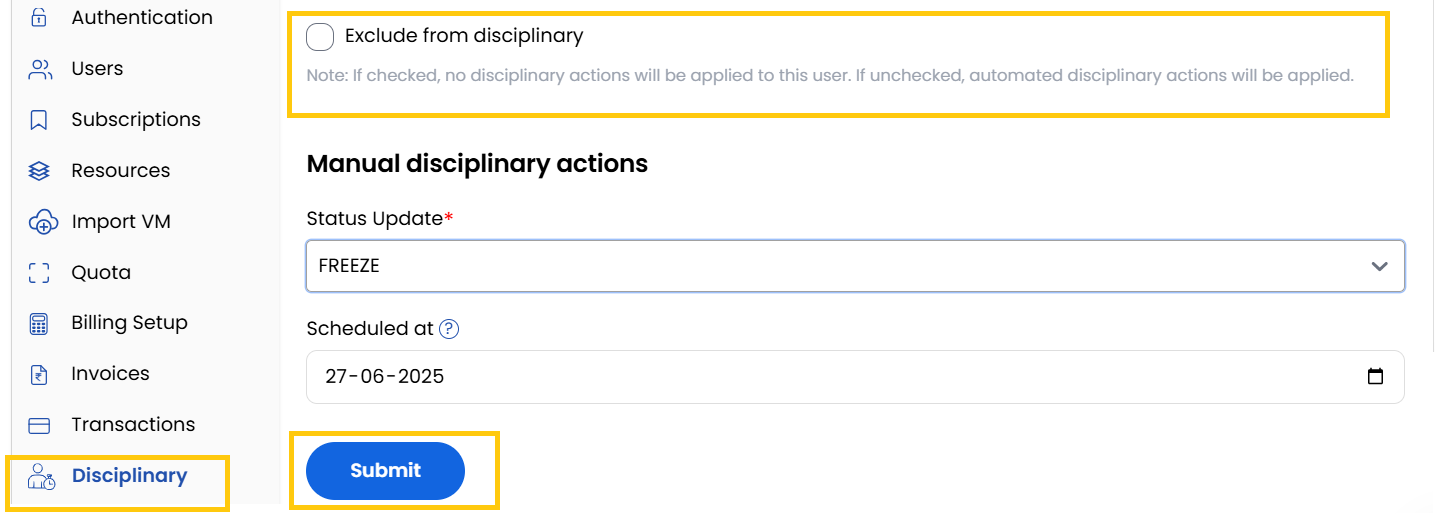
- Displays a comprehensive record of past disciplinary actions applied to the client. Provides transparency and easy reference for client compliance management

Conclusion
The Disciplinary tab provides granular control over client access and restrictions, combining automated enforcement with manual oversight capabilities.
tip
See also: